Manga panel layout: komawari explained with real pages and data
A manga reader never sees your layout. They see a face, a door, a line of dialogue, and then the next one, and if the layout works they never once wonder where to look. This guide measures how real manga does that, across 15,607 published pages, and takes one real page apart to show the moves up close.
What komawari actually controls
Koma means panel and wari means dividing. The word covers more than drawing boxes: it is how a page controls order (what the reader sees first), time (how long they stay on each beat) and surprise (what stays hidden until the page turns).
The critic Natsume Fusanosuke puts it in two words: compression (圧縮) and release (解放). Small, tight panels squeeze time; a big panel lets it out. He argues this push and pull, working across the two facing pages of a spread, is the core of what makes manga enjoyable to read. He also notes that early manga printed panel numbers to show the reading order, a habit that had faded by around 1969 as readers learned the grammar.
What 15,607 real manga pages tell us
Advice about panel counts is usually a guess. So we measured. The Manga109-s dataset contains 87 published volumes by professional mangaka, from the 1970s to the 2010s, with every panel and text box annotated by researchers at the University of Tokyo. Here is what the layout looks like when you add it all up.
- 5panels on a typical page (mean 5.25)
- 75%of pages hold 4 to 7 panels
- 1 in 34pages is a single-panel splash
- 35%of the panel area goes to the biggest panel
Pages by number of panels
Three things stand out:
- Splash pages are rare, so they hit. Only 2.9% of pages are a single panel, and panels that cross both pages of a spread are rarer still (237 out of 81,887). Their power comes from scarcity.
- Pages are not grids. The biggest panel typically takes about a third of the panel area. On a page of five equal panels it would be a fifth. Most pages have one clear lead panel.
- Wide panels win. 43% of panels are clearly wider than tall, 35% are clearly taller than wide, and only 22% are near-square. Wide panels stack into tiers; tall ones break them.
Reading order: right to left, top to bottom
Japanese manga reads from the right-hand page to the left-hand page, and within a page from the top-right corner to the bottom-left. Inside a tier, the rightmost panel comes first; inside a panel, balloons also read right to left. Here is a real page, numbered:
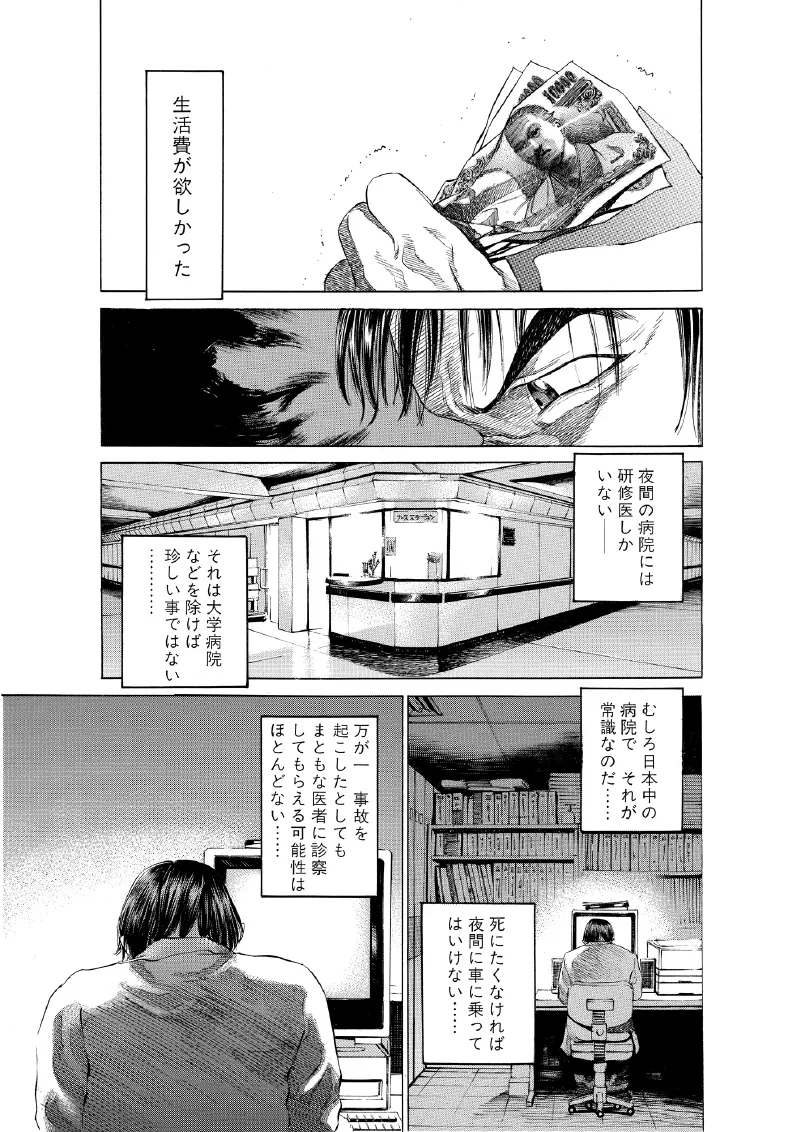
Nobody needs the numbers to read that page, because the layout gives the eye only one easy path. The tiers run the full width of the frame, their edges line up, and the only split comes at the bottom, where right-before-left is the default.
What readers do when the path is unclear
The comics researcher Neil Cohn tested this directly. In a 2013 study, 145 readers numbered the panels of empty layouts. On a plain grid, 94% followed the expected zigzag path. But when a tall panel cut across a row, the zigzag broke: 91 of the 145 went down the column first instead. Readers who read a lot of manga also behaved differently from those who did not.
The study used left-to-right layouts, so mirror it for manga, but the lesson travels. Readers follow the structure of the page before the content of the panels. A tall panel next to two short ones is a fork in the road. If the order matters, close the fork: line the edges up, or make one path clearly shorter.
Where the words go
Lettering is part of the layout, not decoration on top of it. When we stacked every text box from every right-hand page in the dataset, a clear pattern came out:
Where the words sit on a right-hand page
- Top right: the hottest spot. It is where the reader enters the page, so the first line of dialogue lands there.
- Two side bands: vertical Japanese text is tucked against panel edges, so it does not cover faces.
- Centre: the coolest area, left for the drawing.
The page’s first line usually sits where the reader enters, at the top right. After that, text hugs the sides of panels, leaving the centres for faces and action. If your balloons sit in the middle of panels, the art is fighting the words for the same space.
Panel size is time
Size is the main way a layout controls how long a beat lasts. Small panels read fast: a row of narrow slices feels tense, rushed or percussive. A big panel holds the eye, so it carries weight. It suits a landscape, a reveal, or a character who has just changed the scene.
This is Natsume’s compression and release in practice. Two or three small panels squeeze, and one large panel lets go. The real pages bear it out: most pages have one clear lead panel taking about a third of the space, rather than an even grid.
When to spend a splash page
A splash fills a whole page, or a whole spread. It stops time, so it works for a reveal, a decision, an arrival or the end of a long build. In the dataset only about one page in 34 is a single panel. Spend one when the story has built something the reader should take in all at once, and put a page turn in front of it.
Gutters: wider between tiers than between panels
The gutter is the white gap between panels. Most advice just says “a few millimetres.” The measurements say something more useful: the two kinds of gap are not the same width.
- ≈ 2.8 mmmedian gap between tiers, scaled to a B6 page
- ≈ 1.5 mmmedian gap between panels in a row, on the same page
- ≈ 5.6 / 3.1 mmthe same gaps scaled up to a B4 manuscript
Tier gaps come out nearly twice as wide as the gaps inside a tier. That is not decoration. A wide horizontal gap tells the eye “this band is finished, drop down”; a narrow vertical gap says “keep going sideways.” Make them equal and every gap is a choice, which is exactly when readers start reading in the wrong order. You can see the difference on the Black Jack page above, between gaps A and B.
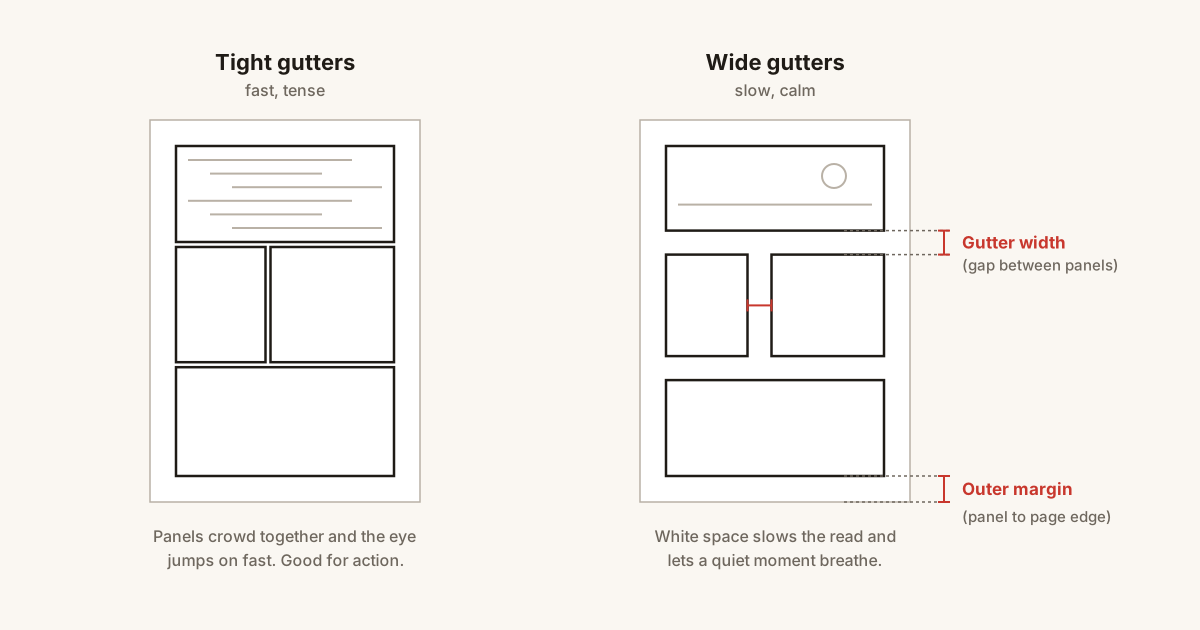
Gutter width as tempo
Once the default is set, vary it on purpose. A narrower gap makes two panels feel like consecutive instants. A wider one lets in a beat of silence, and a very wide one reads as a jump in time or place. For the exact trim, frame and bleed numbers, see the manga page size guide.
Bleed panels
A bleed panel runs past the edge of the page, with no frame line on that side. It makes the image feel bigger than the page, so it suits action, scale and emotion. Bleed off the outer edge, top or bottom, never into the spine, where the art disappears into the binding.
Page turns: the one place you can hide something
A printed manga opens to a spread. The reader sees the right page, then the left, then turns. Whatever is on the next spread arrives all at once, with no warning. This is the most reliable surprise a comic has, because everything else on a spread is visible in the corner of the eye before the reader gets to it.
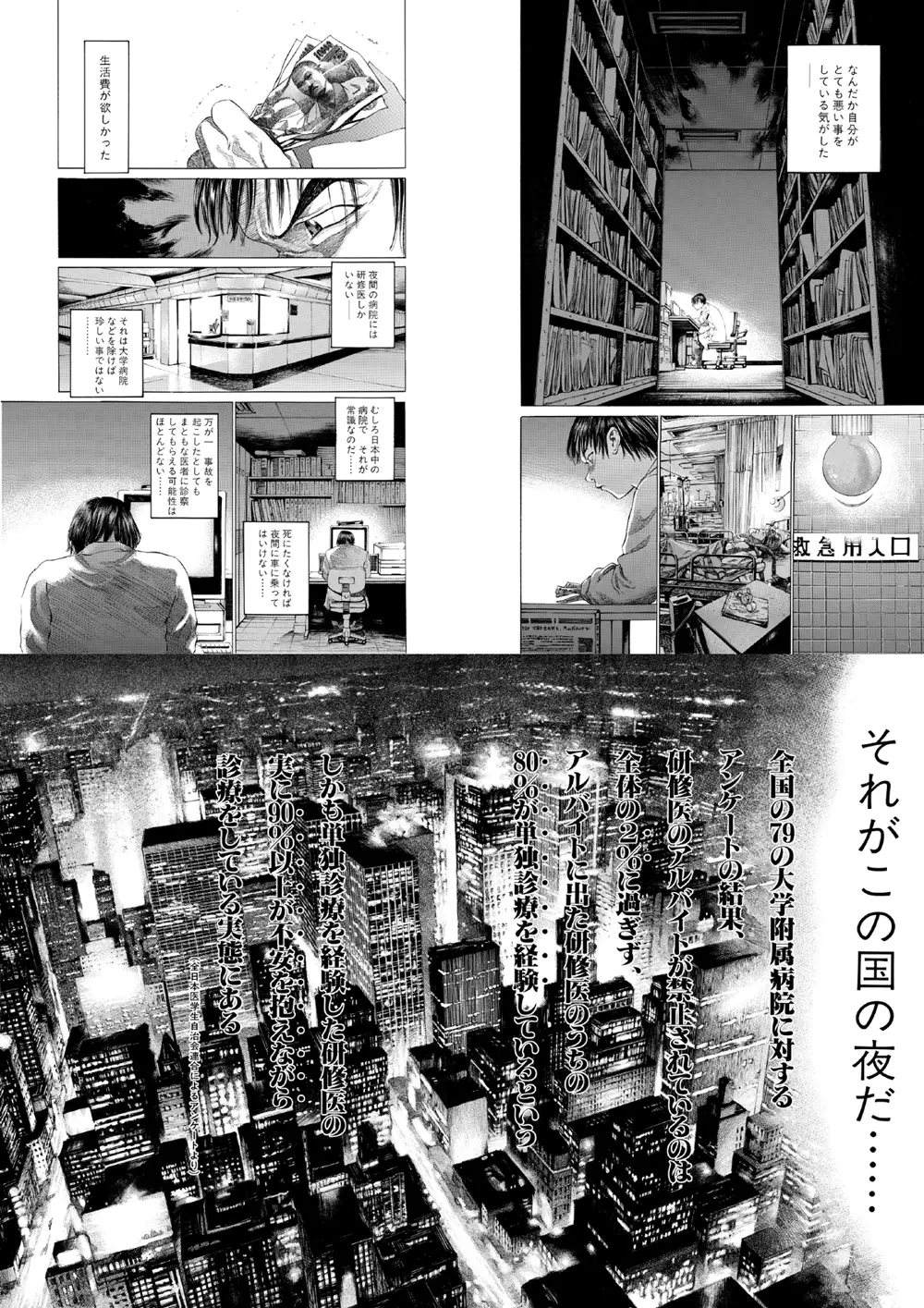
Sato’s sequence works because of where things sit, not just what they are. The left page ends on a quiet line, so the reader turns without suspecting anything. The double-page city spread lands as a statement about the whole country, not one hospital. Placed in the middle of a left page, the same image would have been glimpsed early and lost its force.
The rule: build on the left page, end on a look, a footstep or a half-open door, and put the answer at the top right of the next spread. Plan it at the name stage, covered in the manga storyboard guide, where moving a reveal costs minutes instead of days.
Five layouts to avoid
- A fork in the path. A panel that sits between two tiers, or a tall panel beside two short ones with equal gaps, gives the eye two equally easy routes. Align edges, or widen the tier gap.
- Tangents. Two edges that almost touch, such as a head grazing a panel border, pull the eye to the contact point. Overlap clearly or leave clear space.
- A balloon crossing the gutter backwards. A balloon that spans two panels should run toward the next panel in reading order, to the left and down. Otherwise the reader meets its second half first.
- Grid fatigue. Equal panels on every page produce a steady drone. Real pages give one panel the lead; break the grid with a tall panel, a wide establishing shot or an inset.
- A throwaway panel before a turn. The last panel on a left page is the one the reader sees with their hand on the corner. Put a question, a threat or a held breath there.
A repeatable way to lay out a page
- List the beats. One line each. Cut any beat that does not change something for the reader.
- Pick the heavy beat. The one the page exists for. Decide where it sits: usually the bottom of a page, or the top right after a turn.
- Size the rest around it. Give the heavy beat about a third of the space, lead-in beats small panels, quiet beats medium ones. Five panels is a good default, not a rule.
- Draw the reading path. Trace a line through the panel centres from the top right. If it crosses itself or hesitates, fix the layout, not the balloons.
- Set the gutters last. Tier gaps wider than row gaps; then widen where you want a pause and tighten where you want speed.
Lay out panels in MangaForge
MangaForge is a browser-based manga studio in beta. It does not generate artwork: you draw and plan every page yourself. Its panel layout is a mesh of panels, borders and corners that you edit directly:
- Starter layouts. Begin from a splash, two panels, three rows, three columns, a wide top panel with two below, or a 2×2 or 3×2 grid, then change it.
- Cut panels. Draw a line across a panel with the split tool to cut it in two, straight or curved. Free keeps your angle, Auto snaps near-horizontal or vertical strokes, and Straight forces them. Hold Alt for one free cut, Shift for one straight cut.
- Set gutters per border. Each border has its own gutter width in millimetres, with a page default, so tier gaps and row gaps can differ the way they do in print.
- Bleed and frame lines. Mark a border as bleed so it runs off the page, and turn each frame line on or off with its own thickness.
- Check reading order. Panel number badges and a reading-path overlay show how the eye travels, following the document’s reading direction.
Panel edits live on the same document as the storyboard and the drawing, so you can change the layout after you have started inking. 日本語版: コマ割りツール.
Frequently asked questions
- What is komawari?
- Komawari (コマ割り) is the Japanese term for dividing a manga page into panels and deciding their size, shape and order. It controls reading order, how long each beat lasts, and what stays hidden until the page turns.
- How many panels should a manga page have?
- Across 15,607 pages of the Manga109-s dataset, the most common count is 5 panels, and three in four pages hold 4 to 7. Single-panel splash pages are about 3% of pages. Decide by how long the page should take to read, not by a count.
- How wide should manga gutters be?
- Make the gaps between tiers wider than the gaps between panels in a row. In published manga the tier gap is nearly twice as wide: about 2.8 mm against 1.5 mm on a B6 page, or roughly 5.6 mm and 3 mm on a B4 manuscript.
- How do you read manga panels?
- Right to left and top to bottom. Start at the top-right panel, read each tier from right to left, then drop to the next tier. Balloons inside a panel follow the same order.
- What size is a manga panel?
- There is no fixed panel size. Panels are cut to fit the beat: on a typical published page the largest panel takes about a third of the panel area, and most panels are wider than they are tall.
- Can I use panel templates?
- Templates are fine as a first cut. Real pages rarely use an even grid, so adjust sizes and gutters to the beats on the page, or every page will feel the same.
Sources
- Manga109-s dataset, Aizawa, Yamasaki and Matsui Laboratory, University of Tokyo. Statistics measured by MangaForge from the panel and text annotations; no images used
- Aizawa et al., “Building a Manga Dataset ‘Manga109’ with Annotations for Multimedia Applications,” IEEE MultiMedia 27(2), 2020
- Neil Cohn, “Navigating Comics: An Empirical and Theoretical Approach to Strategies of Reading Comic Page Layouts,” Frontiers in Psychology 4:186, 2013
- Natsume Fusanosuke, “The Functions of Panels (koma) in Manga,” trans. Jon Holt and Teppei Fukuda, ejcjs 21(2)
- Shuho Sato, Give My Regards to Black Jack vol. 1, free secondary-use edition
MangaForge is in beta. Already have an account? Sign in.