Webtoon canvas size: width, height and resolution for every platform
A print manga page has edges: a trim, a bleed, a frame. A webtoon has one edge, the width of a phone, and everything else is time. This guide gives the real numbers for each platform, then takes a page from a published manga and re-lays it as a scrolling strip, so you can see what changes when the page disappears.
Platform specs at a glance
| Platform | Width | Height | Files |
|---|---|---|---|
| WEBTOON (Canvas) | Up to 800 px | Up to 1280 px per image | JPG or PNG; 2 MB per image, 20 MB and 100 images per episode |
| Tapas | 940 px | No limit (PNG/JPG) | PNG, JPG or GIF; up to 10 MB |
| LINE Manga Indies (Japan) | 800 px recommended | 600–10,000 px | Up to 1,000 images |
| comico Challenge (Japan) | 690 px | Up to about 20,000 px | 1–100 images per episode |
| Shueisha · Jump vertical-scroll manga award | 1200 px recommended | Up to 20,000 px per file | At least 80 panels |
| KADOKAWA · vertical-scroll award (2021) | 760 px | Up to 20,000 px | 350 dpi or more, sRGB colour, JPG or PSD |
Platforms change their limits, and contest rules change every round, so check the linked page before you export. The WEBTOON file limits come from its Creators Resource Handbook; the LINE Manga and comico figures come from Clip Studio’s Japanese guide to submitting vertical-scroll work.
Width: the one number that is fixed
A phone shows a webtoon edge to edge, so the platform decides your width and the reader’s screen decides everything else. In the table above, widths run from 690 to 1200 px, and 800 px is the most common target.
Draw at double that width and scale down when you export. Lines drawn at 1600 px and reduced to 800 come out cleaner than lines drawn at 800, and you keep a file big enough for a print edition or merchandise. A Clip Studio tutorial by a WEBTOON creator recommends exactly this: 1600 × 2560 px per section, exported at 800 × 1280.
From working canvas to phone screen
Height: there is no page
A strip is a stack of images shown back to back, so “height” is really two numbers:
- Per-image limit. WEBTOON Canvas takes images up to 1280 px tall and slices anything taller. Japanese contests often allow single files up to 20,000 px.
- Working file length. Few people draw a whole episode as one file. A canvas of 800 × 7680 px (six WEBTOON-sized sections) is a manageable working chunk; split longer episodes across several files.
Where you cut matters only if you slice the images yourself. Cut in the white space between panels, not through a face or a balloon, so a slow connection never shows half a panel.
Resolution and colour
A phone does not know what a dpi is. An 800 px image at 72 dpi and one at 600 dpi look identical on screen. dpi matters only when a contest asks for it (KADOKAWA asked for 350 dpi or more) or when you might print. Two rules do matter:
- Colour space. Export in sRGB. Webtoons are usually full colour, and some contests reject greyscale or bitmap files outright.
- File size. At 2 MB per image on WEBTOON, a busy 800 × 1280 JPG at high quality can exceed the limit. Export at around 85–90% JPG quality and check the file size before uploading.
Spacing is timing
In print, the page decides how much the reader sees at once. In a webtoon, the screen does, and the white space between panels is the only tool you have for time. WEBTOON’s Creators Resource Handbook suggests:
- 200 px+between panels in the same sequence
- 600–1000 pxfor a change of scene
- 2panels on screen at once, at most
The handbook calls these guidelines you can break, and you should, on purpose. A long empty stretch before a reveal works like a page turn: the reader scrolls through nothing and the next panel arrives alone.
For scale: on a phone 390 points wide, an 800 px strip is shown at about half size, so one screen holds about 1,731 px of strip. A 1,000 px scene break is more than half a screen of nothing, which is exactly why it works.
What changes when a print page becomes a strip
To see the difference concretely, we took a page from the official English edition of Shuho Sato’s Give My Regards to Black Jack, which the author allows anyone to adapt, and re-laid it for vertical scroll. Scroll the phone on the right:
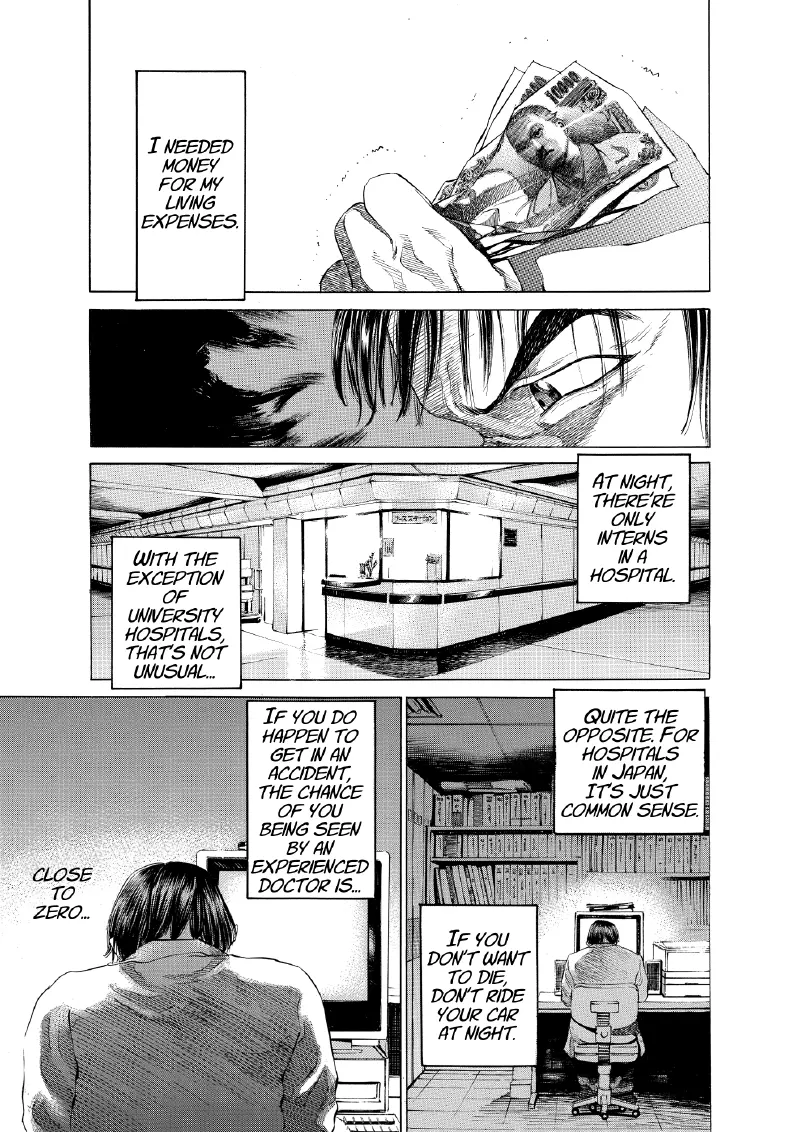
Print page
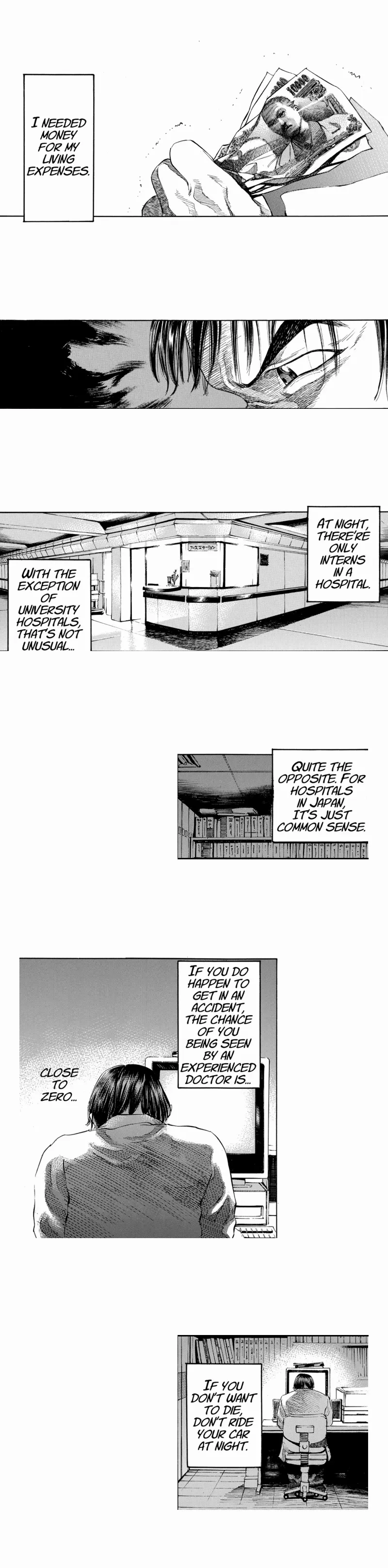
Our vertical-scroll adaptation (scroll it)
Five things had to change, and they will change in your work too:
- Length. One page became 3,237 px, about 1.9 phone screens. A 20-page print chapter, at the 5.25 panels per page measured across 87 published volumes, is roughly 105 panels. Shueisha’s vertical-scroll award asks for at least 80 panels, so one contest episode is in the region of 15 print pages of story.
- Side-by-side panels. A print tier of two panels has to be put in an order. On a page the eye can take them in together; in a strip, one always comes first.
- Panels holding two beats. The bottom-right print panel carried the page’s first and last captions. Stacked whole, it delivered “don’t ride your car at night” before the accident it warns about. It had to be split, with the other panel placed between the halves.
- Width. Narrow print panels can stay narrow and be offset left or right. That zigzag gives the eye somewhere to go while scrolling.
- No bleed, no frame. The page edge is gone. Panels can run the full width, and art can dissolve into white instead of stopping at a border.
If you are adapting existing pages, re-read every caption in its new order. That is where adaptations break, not in the art.
Lettering for a phone
Because the strip is shown at about half its pixel size, text has to be drawn bigger than feels natural on a desktop monitor. Lettering set at 30–36 px in an 800 px export shows at roughly 15–17 points on a 390-point phone, close to the size of a phone’s own body text. Below about 24 px (under 12 points on screen), text gets hard to read without zooming.
Keep balloons a little in from the left and right edges, where a reader’s thumb sits, and keep each balloon short. Aim for one or two balloons on screen at a time.
Common mistakes
- Drawing at 800 px. You cannot scale up later for print or merchandise without losing detail. Work at double width.
- Slicing through panels. If you cut the export yourself, cut in white space.
- Print-style density. Five or six panels close together is a good print page and a cramped strip. Give each panel its own moment on screen.
- Tiny text. Check every episode on an actual phone before you publish.
- Greyscale exports. Some contests reject them, and colour profiles other than sRGB can shift on phones. Export sRGB.
Making print pages instead? See manga page size for trim, bleed and dpi, and manga panel layout for how print pages pace a story.
Frequently asked questions
- What is the best canvas size for a webtoon?
- Work at 1600 px wide and export at the platform width: 800 px for WEBTOON, where each uploaded image can be up to 800 × 1280 px, or 940 px for Tapas. Height is open; split long episodes into several files.
- What size is a WEBTOON Canvas image?
- Each image can be up to 800 px wide and 1280 px tall. WEBTOON’s handbook lists JPG or PNG, up to 2 MB per image, 20 MB and 100 images per episode. Larger images are resized and sliced.
- What dpi should a webtoon be?
- On screen, dpi has no effect; only pixel width matters. Use 350 dpi or more when a contest asks for it or if you may print the work, and draw at double the export width.
- How much space should be between webtoon panels?
- WEBTOON’s Creators Resource Handbook suggests at least 200 px between panels in a sequence and 600–1000 px for a scene change, with no more than two panels on screen at once.
- How long is a webtoon episode?
- It varies by platform. Shueisha’s vertical-scroll manga award asked for at least 80 panels; in our adaptation, one print page became about 3,200 px of scroll at 800 px wide.
- What font size should webtoon lettering be?
- At 800 px wide, lettering of about 30–36 px shows at roughly 15–17 points on a typical phone. Below about 24 px it becomes hard to read without zooming.
Sources
- WEBTOON, Canvas webtoon format (800 × 1280 px)
- WEBTOON, Creators Resource Handbook (file limits, panel spacing)
- Tapas, creating a comic episode
- Clip Studio, Japanese guide to vertical-scroll portals (LINE Manga Indies, comico)
- Clip Studio Tips, webtoon canvas by a WEBTOON creator (1600 × 2560 working size)
- Clip Studio Tips, 800 × 7680 px webtoon canvas
- Shueisha, Jump vertical-scroll manga award rules
- Mannavi, KADOKAWA vertical-scroll award specs (2021)
- Shuho Sato, Give My Regards to Black Jack vol. 1, English free secondary-use edition
Set up a webtoon in MangaForge
MangaForge is a browser-based manga studio, in beta. It does not generate artwork; you draw every panel. Its New page dialog has Screen / webtoon presets sized in pixels, next to the print presets, so a strip and a print chapter can start from the right canvas. For the full process from idea to finished episode, see how to make a manga.
MangaForge is in beta. Already have an account? Sign in.