How to make a manga, step by step
A finished manga page looks like one act of drawing. It is really a dozen decisions made in a particular order, and most of the hard ones happen before any drawing at all. This guide walks through that order, using one real professional manga as the running example and data from 87 published volumes to show what “normal” looks like.
The whole process at a glance
- Find a premise with a contradiction. Write the story in one sentence, with a tension inside it, and decide the ending before you start.
- Pick a length you can finish. Choose a page count from a real contest or platform; for a first one-shot, 16 to 32 pages is realistic.
- Design a few characters. Give each one a silhouette you can recognise at thumbnail size and one want that drives them.
- Plot one line per page. Write what changes on every page, and place each reveal on the first page after a page turn.
- Draw the name (storyboard). Rough every page as spreads: panels, stick figures, real dialogue. Fix the story here, where it is cheap.
- Set up the pages. Make a canvas with trim, bleed and an inner frame at 600 dpi, matching where it will be printed or posted.
- Lay out the panels. Divide each page into panels in reading order, about five per page, with one lead panel.
- Pencil and ink. Refine the figures on a rough layer, then ink on a separate layer with tapered, confident lines.
- Add blacks and screentone. Fill solid blacks and lay dot tones for grey, shadow and mood.
- Letter and add sound effects. Place balloons where the reader enters each panel, then draw the sound effects as part of the art.
- Read it cold, then share it. Read the whole thing in one sitting, cut what drags, and enter a contest or post it online.
For scale, here is what one published volume contains, on average, in the Manga109-s dataset:
- ≈ 179pages with panels
- ≈ 940panels
- 5panels on a typical page
- 8balloons and captions on a typical page
Every one of those panels was planned before it was drawn. That is the real lesson of the numbers: a manga is built from a plan, one page at a time.
1. Find a premise with a contradiction
Write your story in one sentence. Then check that the sentence contains a tension: someone who wants something they cannot easily get, or a situation that is not what it claims to be. Decide the ending now, even roughly. A story that knows where it ends can be cut to length; one that does not will sprawl.
Shuho Sato’s Give My Regards to Black Jack puts its contradiction on the very first page of chapter 1:
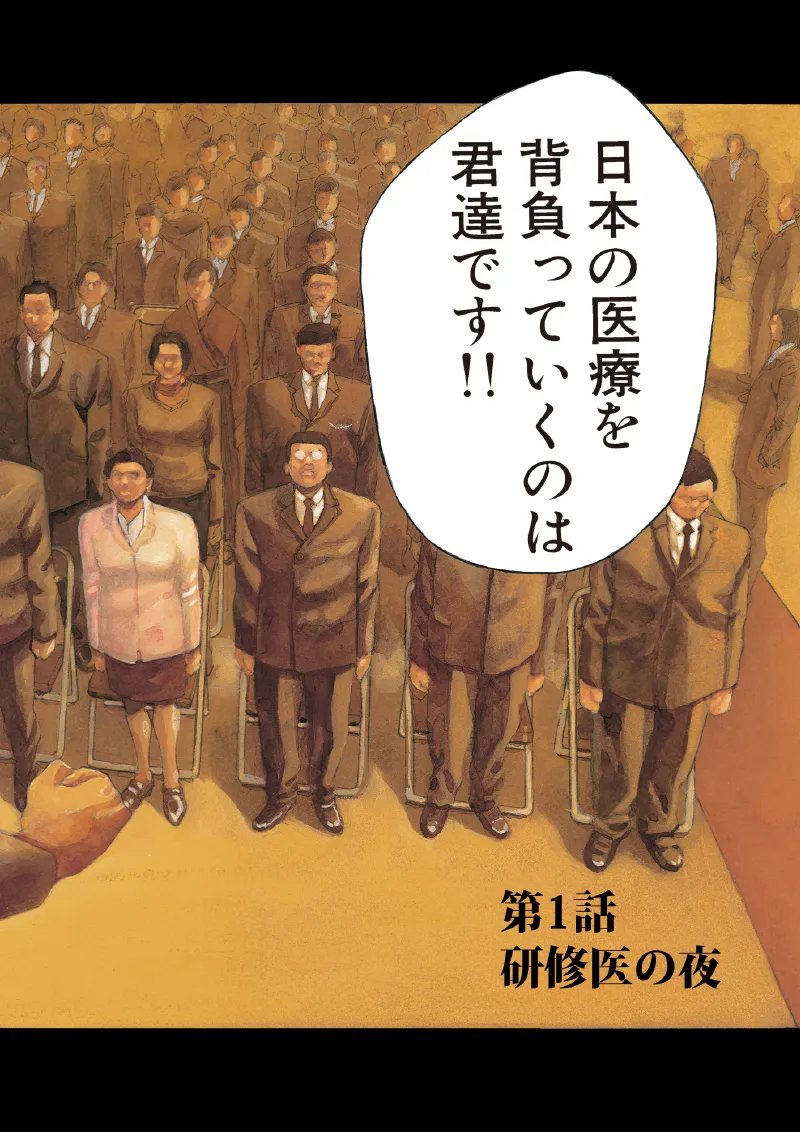
Many manga writing guides teach a four-part shape for this called kishōtenketsu (起承転結): introduce, develop, twist, resolve. It comes from classical Chinese poetry, and four-panel strips still use it panel by panel. You do not have to follow it, but the “twist” slot is a useful check: if nothing on your page plan turns, the story has no third act.
2. Pick a length you can finish
The most common reason a first manga is never finished is that it was planned as a series. Start with a one-shot (読み切り, yomikiri): a complete story in one chapter. Japanese publishers’ own new-artist contests show what lengths are normal:
| Contest | Length |
|---|---|
| Shueisha · Tezuka Award (story manga) | 31 pages |
| Shueisha · Akatsuka Award (gag manga) | 7 pages or more |
| Shueisha · Jump Rookie U23 | 4 to 100 pages recommended |
| Kodansha · Weekly Shonen Magazine new artist award | Up to 50 pages |
| Shogakukan · Shin-Comic award (story manga) | About 32 pages |
| Shogakukan · Shinsedai Sunday award | 18 to 45 pages |
| Shueisha · Grand Jump award | Story 20–60, gag 10–20 |
Rules change with each round, so check the current page before you start. If you are drawing for yourself or for the web, 16 to 32 pages is a realistic first target. It is long enough for a real story and short enough to finish while you still care about it.
3. Design a few characters
Keep the cast small: two or three characters carry most one-shots. Give each one a silhouette you could recognise at thumbnail size, because most of your panels will show them small, and one want that pushes them through the plot. Saitō, the young resident in Sato’s story, wants to be a real doctor, and the system he works in makes that hard. Every scene in the chapter tests that one want.
4. Plot one line per page
Before drawing, write one sentence for every page: what changes there. Mark where the page turns fall. In a right-to-left book the reader turns after each left-hand page, so the next right-hand page is where a reveal lands hardest. If a page’s sentence does not change anything, cut the page or merge it.
This is the skeleton the storyboard hangs on. The storyboard guide covers it in depth.
5. Draw the name (storyboard)
The name (ネーム, nēmu) is a rough draft of every page: panel borders, stick figures, real dialogue, drawn spread by spread. In Japanese publishing it is the version an editor reads and argues about. Rumiko Takahashi is reported to spend about three days on the name for a weekly chapter, before any final drawing.
Name (our reconstruction)
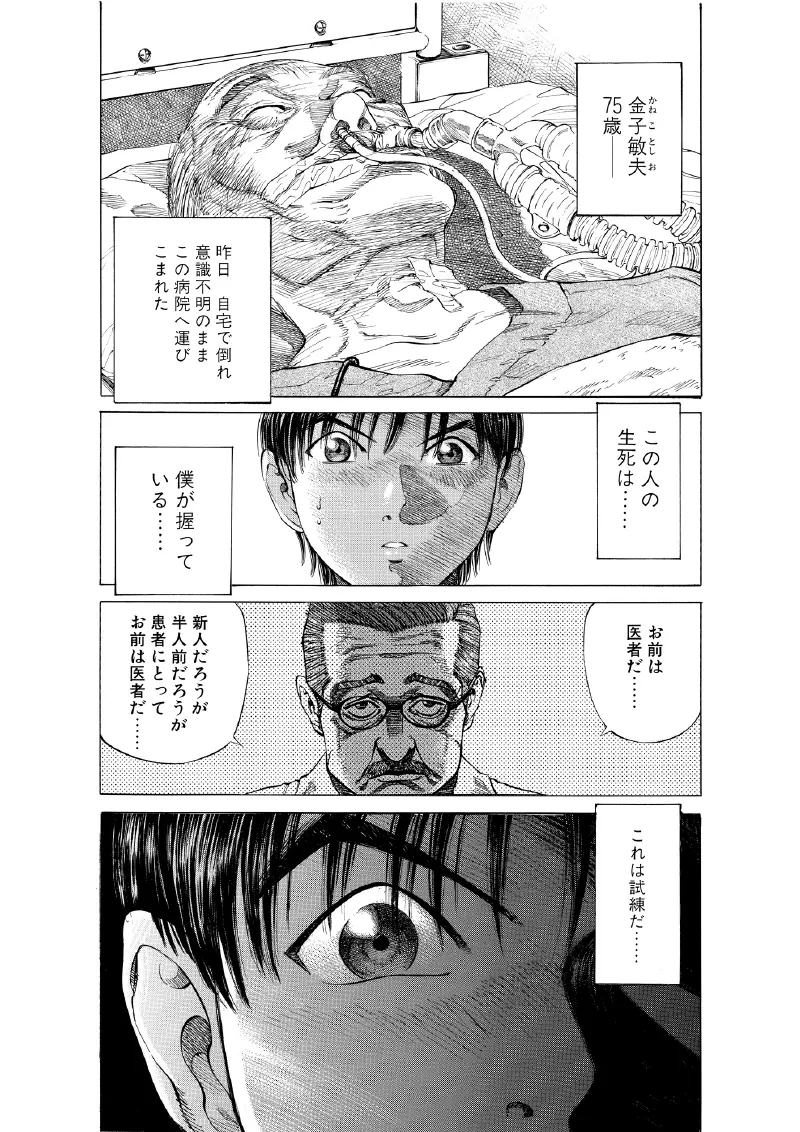
Finished page
Spend your effort here. Moving a reveal, cutting a page or changing a camera angle costs minutes in the name and days in finished art. Full method: how to make a manga storyboard.
6. Set up the pages
Now decide the physical page. Japanese manuscripts are drawn on B4 with panels inside a 180 × 270 mm frame, at 600 dpi in black and white; doujinshi are usually B5 or A5 with 3 mm of bleed; webtoons are a pixel width. Set the canvas once, correctly, and every later step inherits it. Sizes in mm, inches and pixels: manga page size.
7. Lay out the panels
Turn each name page into clean panel borders. A typical published page has 5 panels, the biggest taking about a third of the space, with wider gaps between tiers than between panels in a row so the reading order is obvious. Measurements and real examples: manga panel layout.
8. Pencil and ink
Pencil (or rough digitally) on one layer to fix anatomy and perspective, then ink on a separate layer. The ink line is what gets printed, so it has to carry weight and direction on its own. Look closely at a professional page and almost nothing is a uniform line:
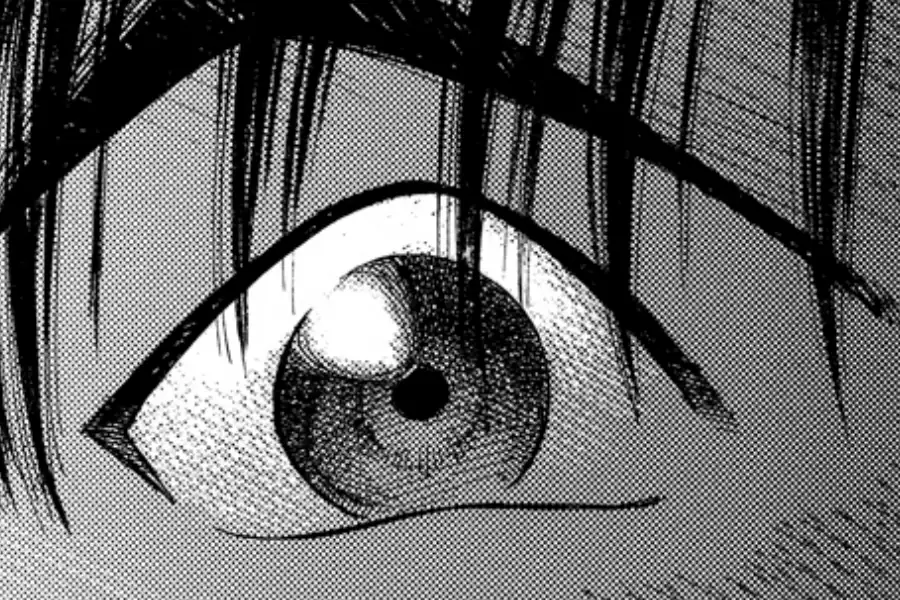
Traditional manga artists ink with dip pens (a G-pen for bold, swelling lines, a maru-pen for fine detail); digital artists imitate the same pressure response. Techniques and practice drills: 6 tips for lineart that does not look stiff.
9. Add blacks and screentone
Print manga has no grey ink. Every grey you see is a pattern of black dots or lines, originally adhesive screentone sheets cut out with a knife, now usually digital. Fill solid blacks first (hair, shadows, night), then lay tones for midtones and mood.
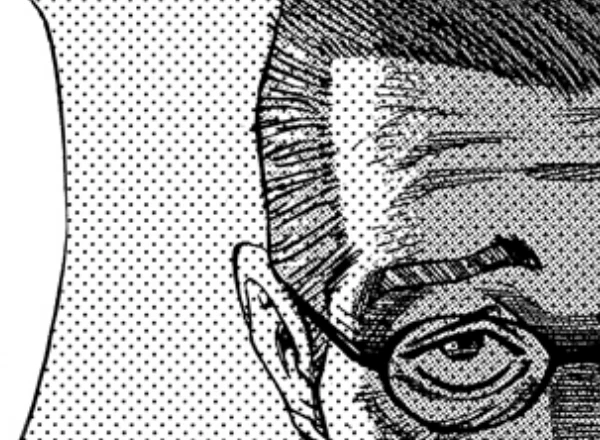
This is why publishers ask for 600 dpi black-and-white files: below that, the dots smear and clash with the printer’s own grid. Placing blacks well is also a composition tool; it is one of the 8 tips for better manga pages.
10. Letter and add sound effects
Lettering is layout. A typical published page carries about 8 balloons and captions, and the first one usually sits at the top right, where the reader enters. Sound effects are drawn as part of the art, not typed on top: the dataset holds 45,422 of them, about 5.6 per spread. What they mean and how readers follow them: how to read manga. For action scenes, see 7 tips for manga action scenes.
11. Read it cold, then share it
Put the finished pages away for a day, then read them in one sitting, as a stranger would. Note every place you hesitate, reread or get bored, and fix those first. Then share it: enter one of the contests above, post it on a manga platform, or print a short run as a doujinshi.
What you need to start
- Paper or a tablet. B4 manga manuscript paper, pencils and a dip pen, or any drawing tablet with pressure sensitivity.
- Software that thinks in pages. You need trim, bleed and an inner frame, panel borders, tones and lettering, not just a blank canvas.
- One finished short story. Not a series bible, not a world map: a complete one-shot is the single most useful thing a beginner can make.
Frequently asked questions
- How do I start making a manga?
- Start with the story, not the drawing: write the premise in one sentence, decide the ending, choose a page count, then plot one line per page and draw a rough storyboard (name) before any final art.
- How many pages should my first manga be?
- A one-shot of 16 to 32 pages is a realistic first project. Japanese contests ask for similar lengths: Shueisha’s Tezuka Award takes 31 pages and Shogakukan’s Shin-Comic award about 32 for story manga.
- What is the order of making manga pages?
- Plot, storyboard (name), page setup, panel layout, pencils, inks, solid blacks and screentone, then lettering and sound effects.
- Can I make manga if I can’t draw well?
- Yes, start anyway. Most of a manga’s quality is decided in the storyboard, which uses stick figures. Clear storytelling with simple art reads better than beautiful art in a confusing layout.
- How long does it take to make a manga chapter?
- It varies widely. Professionals on weekly schedules work with assistants; Rumiko Takahashi is reported to spend about three days on the storyboard alone. A beginner’s 20-page one-shot often takes weeks.
- Do I need to use screentone?
- Not necessarily, but print manga has no grey ink, so every grey must be dots or lines. Screentone, digital or physical, is the standard way to add mid-tones in black-and-white manga.
Sources
- Shuho Sato, Give My Regards to Black Jack vol. 1, free secondary-use edition
- Shueisha, Tezuka and Akatsuka award rules
- Shueisha, Jump Rookie U23 rules
- Kodansha, Weekly Shonen Magazine new artist award
- Shogakukan, Shin-Comic award
- Shogakukan, Shinsedai Sunday award
- Shueisha, Grand Jump award
- Wikipedia, “Kishōtenketsu”
- SoraNews24, Rumiko Takahashi’s weekly schedule, 2021
- Manga109-s dataset, University of Tokyo. Statistics measured by MangaForge from the annotations; no images used
Every step, in one place: MangaForge
MangaForge is a browser-based manga studio, in beta, built around the order in this guide. It does not generate artwork: you write and draw everything yourself. Here is where each step lives:
| Step | In MangaForge |
|---|---|
| Premise, characters, plot | Story planning on a node canvas, scene by scene |
| Name (storyboard) | A storyboard view drawn one spread at a time, with pencil, panel lines and balloons for real dialogue, a Sheet of the whole chapter, and a page-flip read mode |
| Page setup | Paper, manuscript, doujinshi and webtoon presets; 3 or 5 mm bleed; 350 or 600 dpi; print guides; export with bleed, trim only or crop marks |
| Panel layout | Starter layouts, a split tool for straight or curved cuts, gutters in millimetres per border, bleed panels and a reading-path overlay |
| Pencil and ink | Brushes with taper and pressure, layers with opacity, and canvas rotation |
| Blacks and screentone | Screentone on its own layer, so you can try tones without redrawing the ink |
| Lettering | Balloons and lettering on layers in the same file as the art |
| Sharing | Invite collaborators to work on the file with you |
The story, the storyboard and the finished pages are one document, so a change in the plan carries through to the pages instead of starting a new file.
MangaForge is in beta. Already have an account? Sign in.